Typed notes could not capture diagrams, formulas or worked problems in the moment they were taught.
Bringing handwriting into a note-taking product
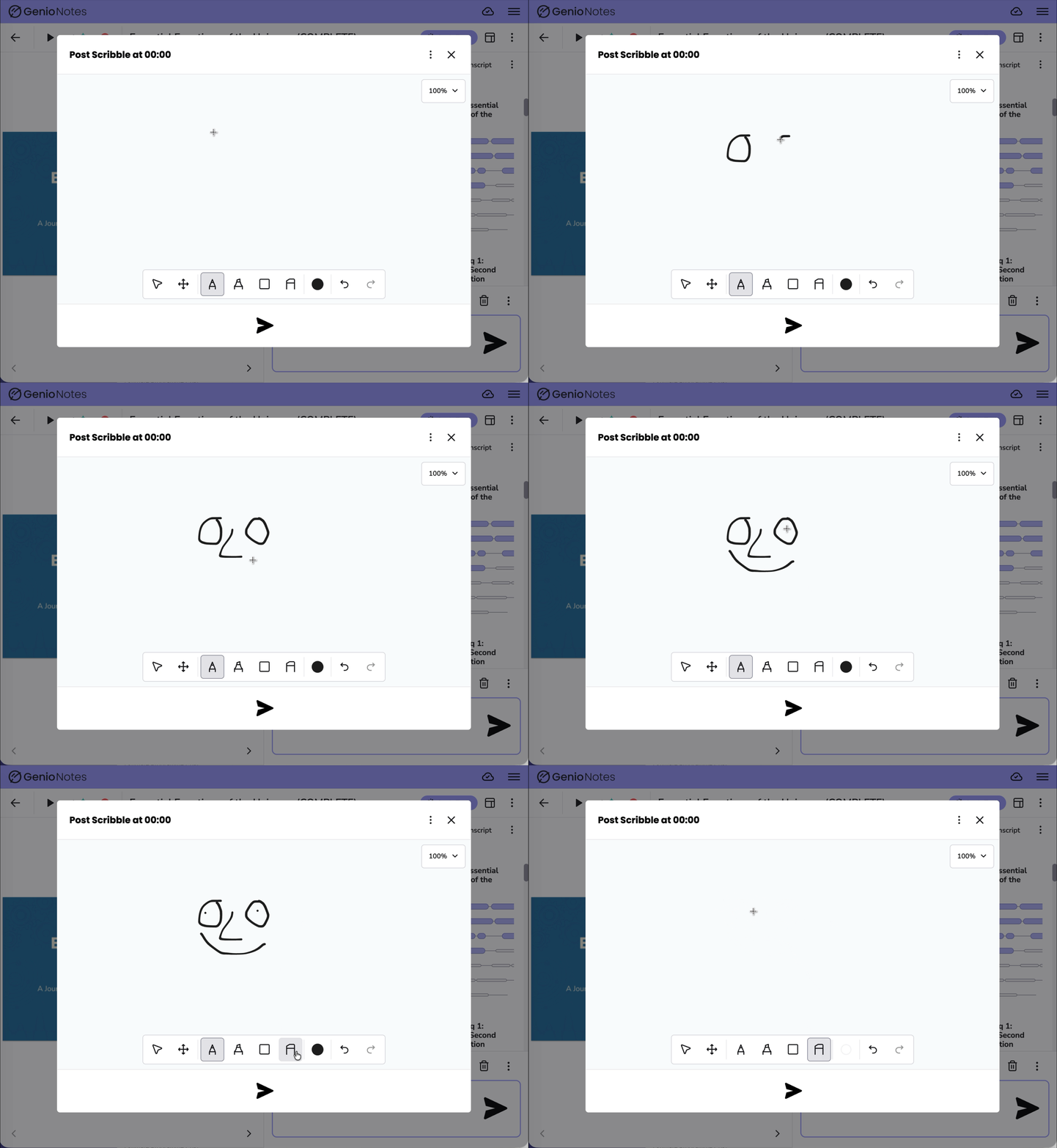
Scribble brought handwritten notes into Genio Notes so students could draw diagrams, formulas and worked problems directly into the recording timeline instead of leaving the product for another tool.
TL;DR
- Background
- Scribble treated handwriting as part of the note feed, giving STEM students a way to capture visual thinking without losing the link back to the recording.
- Approach
- I made handwriting a note card, timestamped and placed in the feed with everything else.
- Outcome
- Launched to web and mobile in June 2024. By the first full semester, 868 learners across 360 institutions had posted 7,750 scribbles, and the pattern became the reference point for later annotation work.
Launched 2024Primary signal
7,750 scribblesProject evidence
360 institutionsDelivered outcome
01 · Problem
The problem behind the brief.
I led the UX work to turn a long-standing request for handwriting into a feature that belonged inside the existing note-taking model. The product was built around typed, timestamped note cards, but the need for handwriting had been known for a long time. Students were already leaving Genio to draw diagrams, formulas and worked answers elsewhere, then losing the connection back to the recording. The design challenge was to make handwriting feel native to Genio Notes rather than a separate drawing app bolted on the side. It also had to work across phone, tablet and desktop, sit on top of a third-party canvas, and remain defensible for accessibility even though the feature was inherently visual.
Students were leaving Genio for paper or drawing tools, which broke the connection to the recording timeline.
The drawing engine came from a third-party canvas, so the Genio experience had to be layered over an inherited interaction model.
02 · Research
Handwriting was filling a gap the product could not.
What I did
I led a discipline-segmented survey with more than 158 student responses
I analysed competitor mentions and subject-specific capture needs
I synthesised existing student and support-team feedback to define the core capture problem
What changed
Survey responses showed a 4.2 out of 5 mean importance that drawing be integrated into the note-taking product.
The research helped prioritise v1 around integrated capture rather than a broad drawing app.
03 · Design
I made handwriting a note card, timestamped and placed in the feed with everything else.
I designed one interaction model across devices, using device-specific adjustments rather than separate experiences.
I prioritised fast capture during a lecture, then supported refinement afterwards.
Scribble as a card
A standalone drawing canvas would have created artefacts that lived outside the notes experience.
I made every scribble a card in the note feed, timestamped against the recording like typed notes.
One interface across devices
Students move between phone, tablet and laptop, sometimes within the same week or the same lecture.
I designed a single layout with device-specific adjustments rather than separate mobile and desktop experiences.
Reducing the distance to the canvas
Beta feedback showed the friction was not drawing itself, but getting to the drawing quickly enough.
I redesigned card adding so card icons were visible instead of hidden behind an extra Add Card step.
Accessibility
Scribble was a visual feature inside a learning product, so the accessibility question was not whether drawing could be made perfect. It was how to reduce exclusion, preserve context, and be honest about the limits of a canvas.
Explored optional alt text for scribbles and images so students could add context without blocking fast lecture capture. Kept scribbles inside the timestamped note feed so visual content still had surrounding lecture context.
04 · Outcome
Handwriting stayed in the workflow.
Launched 2024
7,750 scribbles
360 institutions
Launched to web and mobile in June 2024. By the first full semester, 868 learners across 360 institutions had posted 7,750 scribbles, and the pattern became the reference point for later annotation work.
I took Scribble into mobile beta through Feature Preview, Genio's early-access programme, in March 2024
I worked with Engineering through delivery so web and mobile could launch together in June 2024
The first month produced 699 scribbles from 192 learners across 114 institutions
Scribble let students draw the thing they were being taught, in the moment they were being taught it, and find it again against the recording afterwards. The feature worked because handwriting became part of the study timeline, not a separate canvas floating outside it.
05 · What I learned
Integration mattered more than features.
Getting a real build onto real devices early was the most useful decision I made.
Problem
- Problem
- Students on STEM courses could not represent everything they were being taught with typed notes alone. Diagrams, formulas and live worked problems often pushed them into separate tools, breaking the link back to the recording.
- Users
- Students receiving study support, particularly those on STEM courses, capturing lectures and seminars on phone, tablet and laptop.
- Goal
- Let students capture handwritten and drawn notes inside Genio, timestamped against the recording like every other note, without building a separate drawing product.
Research
Methods
- I led a discipline-segmented survey with more than 158 student responses
- I analysed competitor mentions and subject-specific capture needs
- I synthesised existing student and support-team feedback to define the core capture problem
Key insights
- Handwriting was filling a gap the product could not.
- Survey responses showed a 4.2 out of 5 mean importance that drawing be integrated into the note-taking product.
- The research helped prioritise v1 around integrated capture rather than a broad drawing app.
Design
Direction
- I made handwriting a note card, timestamped and placed in the feed with everything else.
- I designed one interaction model across devices, using device-specific adjustments rather than separate experiences.
- I prioritised fast capture during a lecture, then supported refinement afterwards.
Accessibility
Scribble was a visual feature inside a learning product, so the accessibility question was not whether drawing could be made perfect. It was how to reduce exclusion, preserve context, and be honest about the limits of a canvas.
- Explored optional alt text for scribbles and images so students could add context without blocking fast lecture capture.
- Kept scribbles inside the timestamped note feed so visual content still had surrounding lecture context.
Scribble as a card
A standalone drawing canvas would have created artefacts that lived outside the notes experience.
- I made every scribble a card in the note feed, timestamped against the recording like typed notes.
- Kept posting to the feed as the commit action so the scribble joined the timeline.
One interface across devices
Students move between phone, tablet and laptop, sometimes within the same week or the same lecture.
- I designed a single layout with device-specific adjustments rather than separate mobile and desktop experiences.
- Built resize and zoom into the model from the first concept so screen size did not define how much a student could draw.
Reducing the distance to the canvas
Beta feedback showed the friction was not drawing itself, but getting to the drawing quickly enough.
- I redesigned card adding so card icons were visible instead of hidden behind an extra Add Card step.
- Used a prototype to respond directly to the feedback moment that exposed the issue.
Key iterations
- Tested a live branch on real devices instead of relying only on prototypes.
- Used the survey evidence to prioritise integrated drawing over a wider canvas product.
- Redesigned card adding during beta in response to a clearly explained lecture workflow.
Outcome
- I took Scribble into mobile beta through Feature Preview, Genio's early-access programme, in March 2024
- I worked with Engineering through delivery so web and mobile could launch together in June 2024
- The first month produced 699 scribbles from 192 learners across 114 institutions
What I Learned
- Integration mattered more than features.
- Getting a real build onto real devices early was the most useful decision I made.